Monday, January 2, 2023
Thursday, December 1, 2022
How to Set the Timezone and Configure NTP on Windows Server
Network Time Protocol (NTP) is a highly scalable internet protocol that determines the best time information and synchronizes accurate settings on a computer system. This guide explains how to set the time zone and configure NTP on a Windows Server.
This guide uses Windows Server 2019, but these instructions work on any machine with Server 2016 or later.
Prerequisites
Before you begin:
- Deploy a Vultr Windows Server.
- Connect to the server.
Set the Timezone
Monday, October 24, 2022
Exchange updates step-by-step guide
Tuesday, October 11, 2022
Kiểm tra các mailbox forwarded.
Kiểm tra các email gửi bị lỗi.
Search và xóa email trong Exchange online & On-premise
Friday, October 7, 2022
CÁCH THIẾT LẬP VÀ KẾT NỐI POWERSHELL VỚI MICROSOFT 365
Window PowerShell là ứng dụng có sẵn trên các hệ điều hành Windows. Để sử dụng PowerShell kết nối với tài khoản Microsoft 365 ta làm các bước như sau:
Mở PowerShell
Start / Window PowerShell . Lưu ý bạn phải mở ứng dụng này bằng quyền administrator (chuột phải và chọn Run as administrator )
Tuesday, September 20, 2022
Xóa file log trong vcenter
Thursday, August 18, 2022
vcruntime140_1.dll was not found
Tuesday, August 16, 2022
Xóa offline Address book
Another way to make sure that you get a fresh copy of the OAB is by renaming the oab-files to .old when Outlook is closed.
They are stored in the following location:
- Windows XP
C:\Documents and Settings\%username%\Local Settings\Application Data\Microsoft\Outlook\ - Windows Vista, Windows 7, Windows 8 and Windows 10
C:\Users\%username%\AppData\Local\Microsoft\Outlook
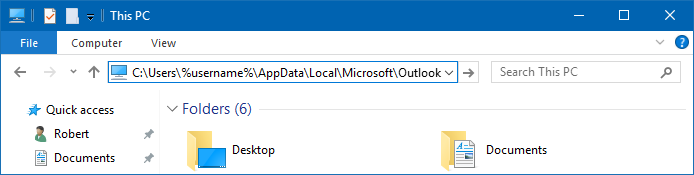
You can paste the path mentioned above in the Address Bar of Explorer to quickly open the location.