Pages

Showing posts with label Mail Exchange. Show all posts

Saturday, October 10, 2026

Fix lỗi add tài khoản vào Outlook Classic báo lỗi.

  1. Đóng hoàn toàn Outlook Classic.
  2. Mở CMD bằng quyền User bình thường.
  3. Chạy 3 lệnh sau:

reg add "HKCU\Software\Microsoft\Office\16.0\Outlook\AutoDiscover" /v ExcludeHttpsRootDomain /t REG_DWORD /d 1 /f

reg add "HKCU\Software\Microsoft\Office\16.0\Outlook\AutoDiscover" /v ExcludeLastKnownGoodUrl /t REG_DWORD /d 1 /f

reg add "HKCU\Software\Microsoft\Office\16.0\Outlook\AutoDiscover" /v ExcludeExplicitO365Endpoint /t REG_DWORD /d 0 /f

4. Sau đó mở lại Outlook Classic và thử tạo Profile mới.

Tuesday, July 28, 2026

Loại trừ User khỏi Dynamic Distribution List bằng CustomAttribute15

## Loại trừ User khỏi Dynamic Distribution List bằng CustomAttribute15

### 1. Kết nối Exchange Online

```powershell
Install-Module ExchangeOnlineManagement -Scope CurrentUser
Import-Module ExchangeOnlineManagement
Connect-ExchangeOnline
```

Friday, May 15, 2026

Xóa email trên Exchange Online


1. https://purview.microsoft.com/ tạo content search, để kiểm tra


2. Kết nối bằng PowerShell để thực hiện Purge

Các lệnh thường dùng
Connect-IPPSSession -EnableSearchOnlySession
Get-ComplianceSearch -Identity "XOAMAIL"
New-ComplianceSearchAction -SearchName "XOAMAIL" -Purge -PurgeType HardDelete
Get-ComplianceSearchAction | Where-Object {$_.SearchName -eq "XOAMAIL"}

Tuesday, November 12, 2024

How to add & upload bulk users in Office 365 distribution group


 File Security-Group-Members.csv


1.  Connect-ExchangeOnline

2. Import-Csv C:\temp\Security-Group-Members.csv | ForEach {Add-DistributionGroupMember -Identity "AllStaffTest1@unicons.vn" -Member $_.Name}

Monday, August 28, 2023

Microsoft Office Outlook Exchange Error 80090016 After a System Board Replacement

Symptoms

You receive the following error, "Your computer's Trusted Platform Module has malfunctioned. If this error persists, contact your system administrator with error code 80090016" after a system board replacement.

Monday, October 24, 2022

Exchange updates step-by-step guide

Exchange updates step-by-step guide
https://setup.microsoft.com/wizard/exchangeupdatesguide

Tuesday, October 11, 2022

Kiểm tra các mailbox forwarded.

Get-mailbox -ResultSize unlimited
# Get all mailboxes Get-mailbox -ResultSize unlimited | Select Name,ForwardingAddress
# Get all mailboxes and ForwardingAddress Get-mailbox -ResultSize unlimited | select Name,ForwardingAddress | where {$_.ForwardingAddress -ne $Null}
# Get mailboxes with maiboxes forwarded

Kiểm tra các email gửi bị lỗi.

Start - Microsoft Exchange Server 2016 - Exchange Management Shell, type :
+ Get-TransportService
# Check service status + Get-TransportService | Get-MessageTrackingLog -Sender abc@dot.vn -MessageSubject "Test" # Check logs sent from HiepIT with subject Test + Get-TransportService | Get-MessageTrackingLog -Sender user@domain.vn -MessageSubject "Test" | Sort-Object Timestamp | ft -AutoSize # Sort time and fit column

Search và xóa email trong Exchange online & On-premise

Cần xóa các email có nội dùng và gửi tới user:

'subject:"Reminder task work 02-12-2020" 
to:"test4@domainabc.vn"'


New-ComplianceSearch `
-Name TestSearch `
-ExchangeLocation All `
-ContentMatchQuery 'subject:"Reminder task work 02-12-2020'

Friday, October 7, 2022

CÁCH THIẾT LẬP VÀ KẾT NỐI POWERSHELL VỚI MICROSOFT 365

Window PowerShell là ứng dụng có sẵn trên các hệ điều hành Windows. Để sử dụng PowerShell kết nối với tài khoản Microsoft 365 ta làm các bước như sau:

Mở PowerShell

Start / Window PowerShell . Lưu ý bạn phải mở ứng dụng này bằng quyền administrator (chuột phải và chọn Run as administrator )

Tuesday, August 16, 2022

Xóa offline Address book

Xóa offline Address book

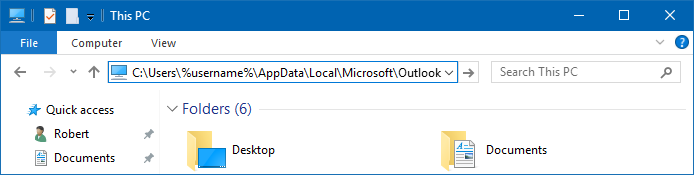
AppData\Local\Microsoft\Outlook\Offline Address Books

Delete the OAB files

Another way to make sure that you get a fresh copy of the OAB is by renaming the oab-files to .old when Outlook is closed.

They are stored in the following location:

  • Windows XP
    C:\Documents and Settings\%username%\Local Settings\Application Data\Microsoft\Outlook\
  • Windows Vista, Windows 7, Windows 8 and Windows 10
    C:\Users\%username%\AppData\Local\Microsoft\Outlook

You can paste the path mentioned above in the Address Bar of Explorer to quickly open the location.

Monday, March 21, 2022

Tìm kiếm 01 email gửi từ 01 IP

Tìm kiếm 01 email gửi từ 01 IP

Get-TransportService | ForEach-Object {Get-MessageTrackingLog -Server $_.Name -MessageSubject "Quota warning" -Start (Get-Date).AddDays(-1) -EventId Submit } | Select-Object -Property Sender,OriginalClientIp

Tuesday, January 5, 2021

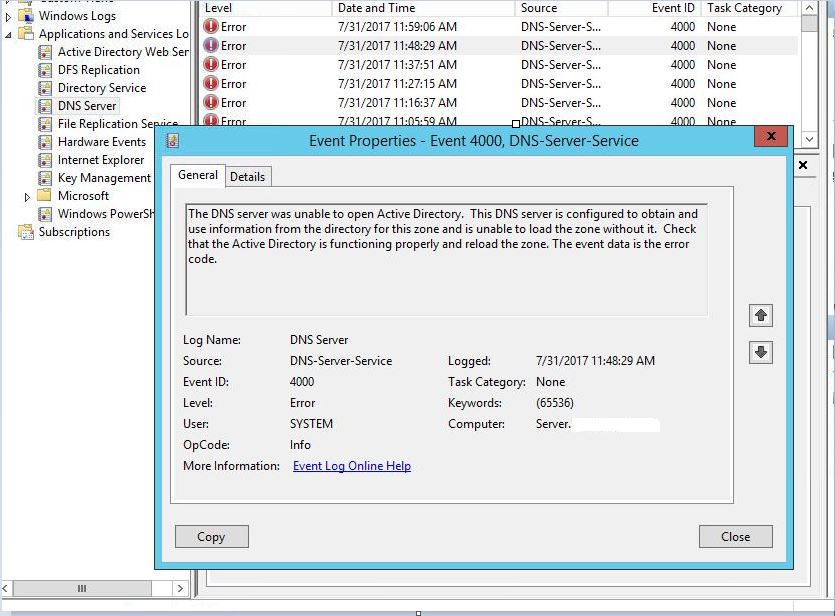
The DNS server was unable to open Active Directory event id 4000

THE DNS SERVER WAS UNABLE TO OPEN ACTIVE DIRECTORY EVENT ID 4000

The DNS server was unable to open Active Directory event id 4000

FIX

Run AS administrator to CMD the server Active Directory and change domain.LOCAL and change Domain\domain_admin

netdom resetpwd /server:<PDC.yshvili.local> /userd:<yshvili\administrator> /passwordd:*

-It will prompt for the password of the Domain Admin account that you used, enter that.
-Once the command executes, reboot the server.
-DNS zones should load now.
-Exchange services should be started.

Friday, December 4, 2020

Comparing Search-Mailbox and Compliance Search Actions

Comparing Search-Mailbox and Compliance Search Actions

Table 1 summarizes the functionality available in Search-Mailbox and purges executed with compliance search actions. Both have their unique characteristics: compliance searches are faster and can process more mailboxes in a single operation but are limited to what they can remove from a mailbox. Search-Mailbox can focus on Recoverable Items or ignore a mailbox’s archive, while compliance searches can focus on a single target folder. The biggest difference is that Search-Mailbox can copy items to a target mailbox when it removes them from other mailboxes. You can export items with a compliance search, but you must do this separately and before you remove anything.

Monday, August 10, 2020

Xóa Mailbox database bằng tay

Dùng khi không thể xóa Mailbox database trên ECP.

1. Kiểm tra trước khi xóa.

Get-MailboxRestoreRequest
Get-MoveRequest

Get-Mailbox -Database DBName1 -monitoring Get-Mailbox -Database DBName1 -Auditlong Get-Mailbox -Database DBName1 -Archive
- Chuyển All mailbox Dabase qua Mailbox khác

Get-Mailbox -Database “Source Database Name” -Arbitration | New-MoveRequest – TargetDatabase “Target Database Name”

Get-Mailbox -Database “Source Database Name” -Archive |

New-MoveRequest -TargetDatabase “Target Database Name”


- Xóa mailbox system Get-Mailbox -Database DBName1 -Archive | Disable-Mailbox - Xem tình trạng
Get-MoveRequestStatistics -MoveRequestQueue “Target Database Name”

Get-MoveRequest | where {$_.status -eq “Completed”} | Remove-MoveRequest


2. Mở ADSIedit và theo đường dẫn như bên dưới.

Configuration > Services > Microsoft Exchange > ExchOrganization > Mailbox Replication

Lưu ý: Kiểm tra chính xác Database cần xóa

[image%255B3%255D.png]

Gỡ bỏ Exchange 2016 bằng command


Mount file ISO Exchange 2016 và gõ lệnh như bên dưới.

X:\ Setup.exe /mode:Uninstall /IAcceptExchangeServerLicenseTerms

X: là ổ đĩa đã mount file ISO

Friday, July 24, 2020

JET_errFileAccessDenied, Cannot access file, the file is locked or in use, Cannot see Active Directory, hr=0x80004005, ec=-501

When the Exchange mailbox database won't mount, you can't access the mailbox files, send or receive emails on Outlook or checking mailbox logs, etc. Don’t worry if you are unable to access the Exchange Server database. On this page, EaseUS software will analyze the causes of why the Exchange Server mailbox database fails to mount and offer reliable solutions to resolve this issue without losing database.

Causes of Exchange mailbox not mounting:


Monday, July 20, 2020

Exchange 2013/2016: HTTP redirection issues with ECP virtual directory – /owa/ecp


Exchange 2013: HTTP redirection issues with ECP virtual directory – /owa/ecp
When you try to access ECP on Exchange 2013, browser redirects to /owa/ecp and shows “Bad Request”
You will see this if HTTP redirection is applied on Default website and those settings got replicated to all Virtual directories underneath.
Let’s look at How to enable HTTP redirect on Exchange 2013.
To enable HTTP to HTTPS redirection on exchange 2013, on IIS VDir highlight Default website and click HTTP Redirect:

Sunday, July 12, 2020

Exchange 2016 Certificate Problem

Khi gặp lỗi như bên dưới, tiến hành kiểm tra Evenlog sẽ thấy lỗi mô tả như bên dưới.

A special Rpc error occurs on server S-XXXXXX: Could not grant Network Service access to the certificate with
thumbprint xxxxxxxxxxxxxxxxxxxxxxxxxxxxx because a cryptographic exception was thrown.
    + CategoryInfo          : NotSpecified: (:) [Enable-ExchangeCertificate], InvalidOperationException
    + FullyQualifiedErrorId : [Server=S-XXXXXX,RequestId=0ce68699-de3e-4ac4-9c7a-094b538d302d,TimeStamp=01/06/2020 13:
   59:03] [FailureCategory=Cmdlet-InvalidOperationException] D9EA479C,Microsoft.Exchange.Management.SystemConfigurati
  onTasks.EnableExchangeCertificate
    + PSComputerName        : s-XXXXXX.xxxxxxxx.co.uk

1. Gỡ bỏ hoặc Disable Antivirus


2. Tiến hành import ssl lại, tham khảo như link bên dưới.


3. Trường hợp khi import ssl mới, vào Ecp, Exchange Console bị lỗi, tham khảo link bên dưới để fix

An error occurred while using SSL configuration for endpoint 0.0.0.0:444 or Microsoft Exchange 2013/ 2016/ 2019 shows blank ECP & OWA after changes to SSL certificates

An error occurred while using SSL configuration for endpoint 0.0.0.0:444

The other day, one of my Exchange 2016 lab servers stopped working. Well, I say "stopped working" but most things seemed to be working except for the Exchange Management Shell where I would get the following error when opening it:
OWA and ECP were also not working: I would simply get a blank page after signing in...