Pages

Showing posts with label O365. Show all posts

Tuesday, July 28, 2026

Loại trừ User khỏi Dynamic Distribution List bằng CustomAttribute15

## Loại trừ User khỏi Dynamic Distribution List bằng CustomAttribute15

### 1. Kết nối Exchange Online

```powershell
Install-Module ExchangeOnlineManagement -Scope CurrentUser
Import-Module ExchangeOnlineManagement
Connect-ExchangeOnline
```

Friday, July 3, 2026

Copy group từ user A qua User B

$SourceUser = "user.source"
$TargetUser = "user.target"

Get-ADPrincipalGroupMembership $SourceUser |
Where-Object {$_.Name -ne "Domain Users"} |
ForEach-Object {
    Add-ADGroupMember -Identity $_.Name -Members $TargetUser
}

Friday, May 15, 2026

Xóa email trên Exchange Online


1. https://purview.microsoft.com/ tạo content search, để kiểm tra


2. Kết nối bằng PowerShell để thực hiện Purge

Các lệnh thường dùng
Connect-IPPSSession -EnableSearchOnlySession
Get-ComplianceSearch -Identity "XOAMAIL"
New-ComplianceSearchAction -SearchName "XOAMAIL" -Purge -PurgeType HardDelete
Get-ComplianceSearchAction | Where-Object {$_.SearchName -eq "XOAMAIL"}

Wednesday, March 26, 2025

Onedrive share cho user bị lỗi không có quyền truy cấp.


Vào link bên dưới, xóa user và share lại.


https://tenant-my.sharepoint.com/personal/thien_nguyen_domain_vn/_layouts/15/people.aspx?
MembershipGroupId=0

Monday, September 11, 2023

Xóa mail box trên cloud

Xóa mail box trên cloud

Get-User user@domain.com | Select name,*Recipient*

Set-User user@domain.com -PermanentlyClearPreviousMailboxInfo -confirm:$false

Monday, January 30, 2023

How to hide/unhide/delete all named ranges in Excel?

A. Xoa NamesRange

1. Hold down the ALT + F11 keys to open the Microsoft Visual Basic for Applications window.

2. Click Insert > Module, and paste the following code in the Module Window.

Sub ShowNames()
'Update 20140318
Dim xName As Name
For Each xName In Application.ActiveWorkbook.Names
    xName.Visible = True
Next
End Sub

//

Tuesday, October 11, 2022

Search và xóa email trong Exchange online & On-premise

Cần xóa các email có nội dùng và gửi tới user:

'subject:"Reminder task work 02-12-2020" 
to:"test4@domainabc.vn"'


New-ComplianceSearch `
-Name TestSearch `
-ExchangeLocation All `
-ContentMatchQuery 'subject:"Reminder task work 02-12-2020'

Friday, October 7, 2022

CÁCH THIẾT LẬP VÀ KẾT NỐI POWERSHELL VỚI MICROSOFT 365

Window PowerShell là ứng dụng có sẵn trên các hệ điều hành Windows. Để sử dụng PowerShell kết nối với tài khoản Microsoft 365 ta làm các bước như sau:

Mở PowerShell

Start / Window PowerShell . Lưu ý bạn phải mở ứng dụng này bằng quyền administrator (chuột phải và chọn Run as administrator )

Tuesday, August 16, 2022

Xóa offline Address book

Xóa offline Address book

AppData\Local\Microsoft\Outlook\Offline Address Books

Delete the OAB files

Another way to make sure that you get a fresh copy of the OAB is by renaming the oab-files to .old when Outlook is closed.

They are stored in the following location:

  • Windows XP
    C:\Documents and Settings\%username%\Local Settings\Application Data\Microsoft\Outlook\
  • Windows Vista, Windows 7, Windows 8 and Windows 10
    C:\Users\%username%\AppData\Local\Microsoft\Outlook
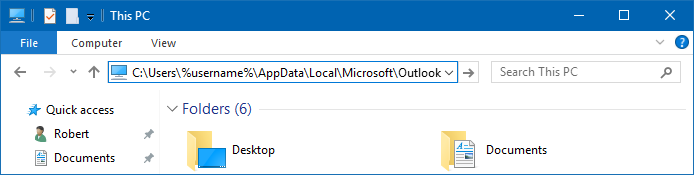
You can paste the path mentioned above in the Address Bar of Explorer to quickly open the location.

Wednesday, July 13, 2022

How to Whitelist an Email Address in Office 365


  1. Open Microsoft 365 Defender
  2. Click on Policies and Rules and choose Threat Policies
  3. Open the Anti-Spam policies
  4. Scroll all the way down in the fly-out and click on Edit allowed and blocked senders and domains

Thursday, July 9, 2020

Cấu hình IIS SMTP Relay qua Office 365


Cấu hình IIS SMTP Relay qua Office 365 

Yêu cầu phải có IP WAN Static và cấu hình Router như bên dưới.
o   Cấu hình trên Router để Server SMTP chỉ đi internet trên IP WAN này
o   Allow port 25 chiều out
Trên Office 365:
-          Allow IP WAN to O365 phần Connector
-          Allow IP WAN filter phần Connection filter

1.      Vào Office 365 / Exchange admin center
Mail flow / Connector
Tạo connect cho phép IP WAN gửi vào O365

Wednesday, July 8, 2020

How do I use Office365 for SMTP?

How to set up a multifunction device or application to send email using Office 365

This article explains how you can send email from devices and business applications when all of your mailboxes are in Office 365. For example:
  • You have a scanner, and you want to email scanned documents to yourself or someone else.
  • You have a line-of-business (LOB) application that manages appointments, and you want to email reminders to clients of their appointment time.

Monday, June 15, 2020

HOW TO: DELETE AND RE-CREATE THE EXCHANGE ECP VIRTUAL DIRECTORY

To delete the ECP virtual directory of your Exchange server and re-create it from scratch, you can use the below to get the identity of the virtual directory.

get-EcpVirtualDirectory |fl

Use this to remove the virtual directory in question

Remove-EcpVirtualDirectory -identity "MYSERVER\ecp (Exchange Back End)"

Create the new virtual directory use the below

New-EcpVirtualDirectory -externalurl "https://outlook.mydomain.com/ecp" -internalurl "https://myserver/ecp" -Server "myserver.mydomain.local"

Wednesday, September 11, 2019

Convert GUID to User Name

Convert GUID to User Name

In Exchange 2010 event logs referring to user mailboxes tend to be in the format of GUID, this makes it a little difficult in troubleshooting and identifying a problematic mailbox. In exchange it is very simple to translate the GUID to display name in powershell.

Copy the GUID in the event ID and  copy into powershell:

get-mailboxstatistics -Identity | fl


You can just as easily use:
get-mailbox -Identity | fl

However the output list is very extensive and it will take some time to locate displayname.

There are a number of articles on how to convert the GUID via script to retrieve the display name, but the line above does the job extremely quickly especially if you use copy and paste with the GUID.

Connect EXO shell dùng Windows PowerShell

Connect EXO shell dùng Windows PowerShell

# Set-ExecutionPolicy RemoteSigned
# $cred = Get-Credential
# $Session = New-PSSession -ConfigurationName Microsoft.Exchange -ConnectionUri https://outlook.office365.com/powershell-liveid/ -Credential $cred -Authentication Basic -AllowRedirection
# Import-PSSession $Session
# Connect-MsolService