Monday, October 26, 2026
Cài .Net Framework 3.5 lỗi Access Denied
Saturday, October 10, 2026
Fix lỗi add tài khoản vào Outlook Classic báo lỗi.
- Đóng hoàn toàn Outlook Classic.
- Mở CMD bằng quyền User bình thường.
- Chạy 3 lệnh sau:
reg add "HKCU\Software\Microsoft\Office\16.0\Outlook\AutoDiscover" /v ExcludeHttpsRootDomain /t REG_DWORD /d 1 /f
reg add "HKCU\Software\Microsoft\Office\16.0\Outlook\AutoDiscover" /v ExcludeLastKnownGoodUrl /t REG_DWORD /d 1 /f
reg add "HKCU\Software\Microsoft\Office\16.0\Outlook\AutoDiscover" /v ExcludeExplicitO365Endpoint /t REG_DWORD /d 0 /f
4. Sau đó mở lại Outlook Classic và thử tạo Profile mới.
Saturday, January 3, 2026
Tổng hợp các câu lệnh tối ưu ổ đĩa C
1. Dọn rác
Chạy bằng cmd quyền Administrator
powercfg -h off
dism /online /cleanup-image /StartComponentCleanup
compact /CompactOS:always
del /s /q C:\Windows\Temp\*
del /s /q %temp%\*
2.Xóa profile không dùng, vào Run / SystemPropertiesAdvanced /User Profiles / Settting
Tuesday, April 16, 2024
Thay đổi Đối tượng User thành Đối tượng inetOrgPerson (hoặc Ngược lại) trong Active Directory
Thursday, March 28, 2024
Free pdf editor
Monday, September 25, 2023
Adding a shared network drive as a Trusted Location
2) Go to Security
3) Trusted Sites
4) Sites
5) Untick Require server verification (https
6) Add the drive (you can add just the mapped drive letter, and it will convert it to UNC, or just the ip of the host)
In excel if it doesn't work also check that in the Trust Center and make sure network locations are authorized and that macro security level is set to at least have a notification that you will be able to accept.
Wednesday, August 30, 2023
Monday, August 28, 2023
Microsoft Office Outlook Exchange Error 80090016 After a System Board Replacement
Symptoms
You receive the following error, "Your computer's Trusted Platform Module has malfunctioned. If this error persists, contact your system administrator with error code 80090016" after a system board replacement.
Monday, January 2, 2023
Thursday, December 1, 2022
How to Set the Timezone and Configure NTP on Windows Server
Network Time Protocol (NTP) is a highly scalable internet protocol that determines the best time information and synchronizes accurate settings on a computer system. This guide explains how to set the time zone and configure NTP on a Windows Server.
This guide uses Windows Server 2019, but these instructions work on any machine with Server 2016 or later.
Prerequisites
Before you begin:
- Deploy a Vultr Windows Server.
- Connect to the server.
Set the Timezone
Tuesday, October 11, 2022
Kiểm tra các email gửi bị lỗi.
Thursday, August 18, 2022
vcruntime140_1.dll was not found
Tuesday, August 16, 2022
Xóa offline Address book
Another way to make sure that you get a fresh copy of the OAB is by renaming the oab-files to .old when Outlook is closed.
They are stored in the following location:
- Windows XP
C:\Documents and Settings\%username%\Local Settings\Application Data\Microsoft\Outlook\ - Windows Vista, Windows 7, Windows 8 and Windows 10
C:\Users\%username%\AppData\Local\Microsoft\Outlook
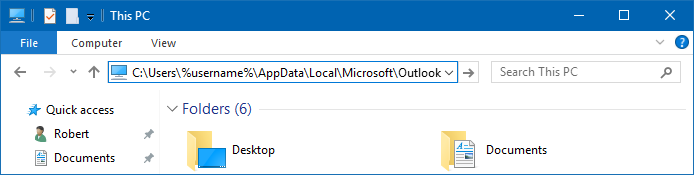
You can paste the path mentioned above in the Address Bar of Explorer to quickly open the location.
Monday, July 18, 2022
SỬ DỤNG ỨNG DỤNG CÓ SẴN XBOX ĐỂ QUAY MÀN HÌNH TRỰC TIẾP
Xbox Game Bar là ứng dụng có sẵn, đi kèm miễn phí với phiên bản mới của Window 10. Vốn dĩ, phần mềm này được ra đời để giúp người chơi theo dõi hiệu suất máy tính của họ. Tuy nhiên, bạn vẫn có thể tận dụng tính năng của ứng dụng này để ghi lại màn hình máy tính của mình, ngay cả khi không chơi game.
Tuesday, April 26, 2022
Sửa lỗi vcruntime140_1.dll
Friday, March 18, 2022
Khắc phục lỗi 0x0000011b khi kết nối máy in qua Printer Server
Chỉnh trên Printer Server, trường hợp không dùng Printer Server thì chỉnh trên máy Client
Vào Registry để khách phục lỗi error 0x0000011b
Với cách số 2 này bạn không cần gỡ bản cập nhật (KB5005565). Tiến hành theo các bước như sau.
Bạn nhấn Phím Windows + R mở hộp thoại Run tiếp theo nhập Regedit nhấn phím Enterđể mở Registry Editor.
Tìm đến khóa theo đường dẫn: HKEY_LOCAL_MACHINE\System\CurrentControlSet\Control\Print
Bạn tạo một giá trị DWORD-32bit mới có tên RpcAuthnLevelPrivacyEnabled và đặt giá trị của nó là 0 giống như ảnh bạn có thể thấy bên dưới:
Thursday, February 25, 2021
Trình duyệt hỗ trợ chạy Flash
Friday, February 21, 2020
Hướng dẫn active Windows 2016
Nếu bạn ban chạy bản Standard Evaluation thì bạn chỉ cần chạy lệnh sau để chuyển từ Evaluation qua Full và Active key luôn
dism /online /set-edition:ServerStandard /productkey:WC2BQ-8NRM3-FDDYY-2BFGV-KHKQY /accepteula
Monday, December 2, 2019
Cầu phân áp, chia áp và phần mềm tính toán
Monday, December 3, 2018
How To Reset The Outlook Address Cache
If you are typing email addresses into your Outlook and they have gone wonky there are several things you can do but the easiest is likely just to flush the Outlook Address autocomplete cache. In old versions of Outlook, that meant deleting the .NK2 file from %appdata%\Microsoft\Outlook however in Outlook 2016 (actually since Outlook 2010) your ‘nickname’ cache is stored in %localappdata%\Microsoft\Outlook\RoamCache
There are three easy ways to empty the Outlook Autocomplete Email Address Cache:
1. Flush The Outlook Email Address Cache Using File Manager:
Close Outlook
Using File Explorer, MY PC, THIS PC or whateva’, go to %localappdata%\Microsoft\Outlook\RoamCache
Delete Stream_Autocomplete_0_
Open Outlook
Have a nice day
2. Flush The Outlook Email Address Cache Using the Outlook GUI:clear-autocomplete-outlook-address-cache
Open Outlook
Click FILE
Click OPTIONS
Click MAIL
Scroll down about half way and select EMPTY AUTOCOMPLETE button
Have a nice day
3. Flush The Outlook Email Address Cache Using Command Line:
outlook.exe /cleanautocompletecache
Have a nice day
If you have any questions, post them here or read:
https://www.slipstick.com/outlook/email/understanding-outlooks-autocomplete-cache-nk2/
https://grok.lsu.edu/article.aspx?articleid=18029
