Pages

Showing posts with label Hardware-Server. Show all posts

Wednesday, August 30, 2023

Fix lỗi ổ đĩa không tương thích Unverified trên thiết bị NAS Synology


Fix lỗi ổ đĩa không tương thích Unverified  trên thiết bị Nas Synology

Thursday, December 1, 2022

How to Set the Timezone and Configure NTP on Windows Server

How to Set the Timezone and Configure NTP on Windows Server


Network Time Protocol (NTP) is a highly scalable internet protocol that determines the best time information and synchronizes accurate settings on a computer system. This guide explains how to set the time zone and configure NTP on a Windows Server.

This guide uses Windows Server 2019, but these instructions work on any machine with Server 2016 or later.

Prerequisites

Before you begin:

Set the Timezone

Tuesday, September 20, 2022

Xóa file log trong vcenter

Xóa file log trong vcenter

// Xem thông tin các ổ đĩa
df -h

// Chuyển tới thư mục cần xóa
cd /storage/log ; cd vmware/

//Xem các file log trong thư mục
 /storage/log/vmware ]# ls

//Xem dung lượng thư mục
 du -sh * | grep G

//Chuyển tới thư mục cần xóa
cd sso

//Xóa các file có tên
rm -rf localhost_access*
rm -rf catalina*

//Kiểm tra lại
root@vcenter [ /storage/log/vmware/sso ]# df -h

Saturday, June 20, 2020

Check if activation is blocked on that server for the DB

Check if activation is blocked on that server for the DB. The error indicates that
Get-MailboxDatabaseCopyStatus  MBX-DB1\EMAIL2 |FL activationsuspended
or for the entire server
Get-MailboxServer  EMAIL2 | FL DatabaseCopyAutoActivationPolicy
If you want to remove that block:
Get-MailboxDatabaseCopyStatus  MBX-DB1\EMAIL2 |  Resume-MailboxDatabaseCopy

Wednesday, June 10, 2020

VCenter 6.7: Resizing disk fails with error message

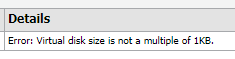
VEEAM failed recently to backup one of your servers. The error message was “Error: Virtual disk size is not a multiple of 1KB.”.
Error: Virtual disk size is not a multiple of 1KB

Monday, August 13, 2018

Phân biệt Thick & Thin Provisioning

Phân biệt Thick & Thin Provisioning

Tuy nhiên để VM đạt được hiệu năng tốt nhất để đáp ứng nhu cầu riêng biệt cho VM bạn phải hiểu và chọn định dạng phân vùng phù hợp.

LÀM CÁCH NÀO CÓ THỂ GIẢM “SHRINK A FILE VMDK” Ổ CỨNG CỦA MÁY ẢO ?

LÀM CÁCH NÀO CÓ THỂ GIẢM “SHRINK A FILE VMDK” Ổ CỨNG CỦA MÁY ẢO ?


Trong quá trình làm việc tại Doanh nghiệp, các bạn quản trị viên đều phải làm thế nào để giảm kích thước phân bổ của Thick ổ đĩa ảo được cung cấp cho máy ảo.

Tăng kích thước VMDK có thể được thực hiện trong GUI của vSphere client/ Web Sphere, nhưng để giảm kích thước của VMDK lại không được phép.

Trong hầu hết các trường hợp, Đối với máy ảo đĩa cứng thu nhỏ có thể được thực hiện thông qua các tool như: P2V, V2V, VMware Converter Freeware. Đây là phương pháp an toàn nhất để làm giảm kích thước máy ảo VMDK, nhưng có một phương pháp đơn giản khác giúp tiết kiệm rất nhiều so với P2V, V2V.

Tuesday, March 21, 2017

To make it easier to access the BIOS setup screen

To make it easier to access the BIOS setup screen, edit the virtual machine's configuration (.vmx) and add or edit one of these options:
bios.forceSetupOnce = "TRUE"
This forces entry to the BIOS setup at startup.
bios.bootDelay = "xxxx"
This adds a delay to the initial POST screen, showing it for longer and giving you more time to access the BIOS setup, where xxxx is the number of milliseconds to show the POST screen. (There are 1000 milliseconds in a second.) The maximum value for the boot delay is 10000 milliseconds or 10 seconds.

Wednesday, April 2, 2014

Các chuẩn DVI có thể chuyển trực tiếp sang VGA

Các chuẩn DVI có thể chuyển trực tiếp sang VGA là các chuẩn mà trong đó có cả các tín hiệu Analog đi cùng. cụ thể là DVI-I(DVI digital & Analog), DVI-A(DVI Analog)

Còn chuẩn DVI-D thì muốn chuyển sang VGA thì phải có mạch chuyển hoặc adaptor(cái này ko đề cập đến nữa)


Sau đây là vị trí cách chuyển DVI-I qua VGA.chuẩn DVI-A tương tự nhé


C1-------->chân 1(RED)
C2--------> Chân 2(Green)
C3--------> chân 3(Blue)
C4--------> chân 13(Hsync)
C5--------> chân 6,7,8(GND)
chân 8-----> chân 14(Vsync)
chân 6-----> chân 15(Clock)
Chân 7----->chân 12 (Data)