Pages

Showing posts with label WindowsServer. Show all posts

Monday, October 26, 2026

Cài .Net Framework 3.5 lỗi Access Denied

1. Mount ISO Windwos 11 vào máy tính

dir E:\sources\sxs

2. Chạy command bên dưới quyền Administrator.

DISM /Online /Enable-Feature /FeatureName:NetFx3 /All /Source:E:\sources\sxs /LimitAccess

Friday, July 3, 2026

Copy group từ user A qua User B

$SourceUser = "user.source"
$TargetUser = "user.target"

Get-ADPrincipalGroupMembership $SourceUser |
Where-Object {$_.Name -ne "Domain Users"} |
ForEach-Object {
    Add-ADGroupMember -Identity $_.Name -Members $TargetUser
}

Friday, January 26, 2024

Download Apps O365

https://portal.office.com/account/?ref=MeControl#installs

Monday, January 22, 2024

Unlock user admin Forescout

fstool unlock_console_user admin

Wednesday, August 30, 2023

Fix lỗi ổ đĩa không tương thích Unverified trên thiết bị NAS Synology


Fix lỗi ổ đĩa không tương thích Unverified  trên thiết bị Nas Synology

Monday, July 18, 2022

SỬ DỤNG ỨNG DỤNG CÓ SẴN XBOX ĐỂ QUAY MÀN HÌNH TRỰC TIẾP

Xbox Game Bar là ứng dụng có sẵn, đi kèm miễn phí với phiên bản mới của Window 10. Vốn dĩ, phần mềm này được ra đời để giúp người chơi theo dõi hiệu suất máy tính của họ. Tuy nhiên, bạn vẫn có thể tận dụng tính năng của ứng dụng này để ghi lại màn hình máy tính của mình, ngay cả khi không chơi game.
Thursday, June 18, 2020

Database Unable to Mount while Restoring the Microsoft Exchange Database

Database Unable to Mount while Restoring the Microsoft Exchange Database

Symptom
When I restore a Microsoft Exchange database, the database is unable to mount. The required logs are missing or the transaction logs are not contiguous. There are event errors such as 454, 455, and 2006 in the event log.

Wednesday, June 10, 2020

VCenter 6.7: Resizing disk fails with error message

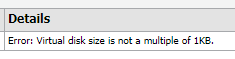
VEEAM failed recently to backup one of your servers. The error message was “Error: Virtual disk size is not a multiple of 1KB.”.
Error: Virtual disk size is not a multiple of 1KB

Friday, February 21, 2020

Hướng dẫn active Windows 2016

Hướng dẫn active Windows 2016, How to Upgrade Windows Server 2016 Evaluation to Full
Hướng dẫn active Windows 2016, How to Upgrade Windows Server 2016 Evaluation to Full Version


Nếu bạn ban chạy bản Standard Evaluation thì bạn chỉ cần chạy lệnh sau để chuyển từ Evaluation qua Full và Active key luôn


dism /online /set-edition:ServerStandard /productkey:WC2BQ-8NRM3-FDDYY-2BFGV-KHKQY /accepteula

Monday, December 3, 2018

Delete old logs on Exchange servers

The following commands delestes logs older than 14 days on Exchange servers:
forfiles /p C:\inetpub\logs /s /m *.log /d -14 /c “cmd /c del @path”
forfiles /p C:\Program Files\Microsoft\Exchange Server\V15\Bin\Search\Ceres\Diagnostics\ETLTraces /s /m *.log /d -14 /c “cmd /c del @path”
forfiles /p C:\Program Files\Microsoft\Exchange Server\V15\Bin\Search\Ceres\Diagnostics\Logs /s /m *.log /d -14 /c “cmd /c del @path”
forfiles /p C:\Program Files\Microsoft\Exchange Server\V15\Logging /s /m *.log /d -14 /c “cmd /c del @path”
forfiles /p C:\Program Files\Microsoft\Exchange Server\V15\Logging\Diagnostics\PerformanceLogsToBeProcessed /s /m *.log /d -14 /c “cmd /c del @path”
forfiles /p C:\Program Files\Microsoft\Exchange Server\V15\Logging\Monitoring\Monitoring\MSExchangeHMWorker\ActiveMonitoringTraceLogs /s /m *.log /d -14 /c “cmd /c del @path”
forfiles /p C:\Program Files\Microsoft\Exchange Server\V15\TransportRoles\data\Temp /s /m *.log /d -14 /c “cmd /c del @path”

Thursday, May 24, 2018

Lỗi This could be due to CredSSP encryption oracle remediation khi remote desktop

Một số bản cập nhật của Windows gần đây (5/2018) gia tăng bảo mật nên ảnh hưởng tới ứng dụng Remote Desktop của Windows. Khi bạn mở ứng dụng Remote Desktop để connect vào Server hay VPS gặp lỗi như sau:

Giải pháp tạm thời (không khuyến khích)

Cách 1:

1. Mở cửa sổ Run (Windows + R)
2. Nhập vào nội dung: gpedit.msc sau đó chọn OK
3. Chọn theo các mục sau: Computer Configuration > Administrative Templates > System > Credentials Delegation
4. Chọn dòng: Encryption Oracle Remediation policy và chỉnh sửa thành Enabled, nhìn phía dưới và thay đổi Protection Level thành Vulnerable
5. Mở lại cửa sổ run như bước 1, gõ lệnh: gpupdate /force rồi chọn OK.

Cách 2:

Monday, July 24, 2017

Export AD Users to CSV using Powershell Script

Export AD Users to CSV using Powershell Script

Description:

We can easily export Active Directory users to CSV file using Powershell cmdlets Get-ADUser and Export-CSV. In this article, I am going to write Powershell script samples to Export AD Users to CSV file and Export AD Users from Specific OU to CSV file using Powershell Script.

Summary:

Export AD Users to CSV using Powershell

The following command export the selected properties of all Active Directory users to CSV file. You can add more attributes as per your wish, refer this article:Get-ADUser Default and Extended Properties to know more supported AD attributes.
1
2
3
4
Import-Module ActiveDirectory
Get-ADUser -Filter * -Properties * |
 Select -Property Name,Mail,Department |
 Export-CSV "C:\\AllADUsers.csv" -NoTypeInformation -Encoding UTF8
Export AD Users to CSV using Powershell Script

Export AD Users to CSV with Filter using Powershell

This command export the selected properties to CSV file of AD users whose City contains the text 'Austin'.
Note: Refer this article:Get-ADUser Default and Extended Properties to know more supported AD attributes.
1
2
3
4
Import-Module ActiveDirectory
Get-ADUser -Filter 'City -like "*Austin*"' -Properties * |
  Select -Property Name,City,Mail,Department,DistinguishedName |
  Export-CSV "C:\\ADUsers.csv" -NoTypeInformation -Encoding UTF8

Export AD Users by LDAP Filter:

Instead of SQL Like Filter, you can also use LDAP Filter to select only required users. Refer this article (AD LDAP Filter Examples) to get more LDAP filter examples. The below command exports all the users who are belongs to Admin department.
1
2
3
4
Import-Module ActiveDirectory
Get-ADUser -LDAPFilter '(Department=*Admin*)' -Properties * |
  Select -Property Name,City,Mail,Department,DistinguishedName |
  Export-CSV "C:\\AdminUsers.csv" -NoTypeInformation -Encoding UTF8

Export ADUsers CSV output:

Get-ADUser - Export Selected properties to CSV file

Export AD Users from specific OU to CSV using Powershell

We can set target OU scope by using the parameter SearchBase. This following command select all the AD users from the Organization Unit 'Austin' and export it to CSV file.
1
2
3
4
Import-Module ActiveDirectory
Get-ADUser -Filter * -SearchBase "OU=Austin,DC=TestDomain,DC=Local" -Properties * |
 Select -Property Name,Mail,Department |
 Export-CSV "C:\\AustinUsers.csv" -NoTypeInformation -Encoding UTF8
Export AD Users from specific OU to CSV using Powershell Script

Tuesday, August 26, 2014

SAN vs NAS - Difference between a Storage Area Network and Network Attached Storage


If you are managing your own infrastructure in your own private data center, then you are bound to go through a selection of different storage offerings. Selecting a storage solution pretty much depends on your requirement. Before finalizing a particular storage option for your use case, a little bit of understanding about the technology is always helpful.

Friday, June 6, 2014

Phim tắt vào Bios Sony Vaio, HP, Lenovo, Dell Acer, Asus

SONY VAIO
Vào Bios ------- nhấn F2
Recovery --------nhấn F10

Để boot vào đĩa CD/DVD thì các bạn cho đĩa vào ổ đĩa rồi khởi động lại máy, máy sẽ tự động boot vào ổ đĩa.(vì dòng SONY mạc định là boot ổ CD/DVD đầu tiên rồi).

HP – Compaq

Vào Bios ------nhấn F10
Chọn boot - ---nhấn F9
Recovery--- ---nhấn F11

Tuesday, November 26, 2013

List AD replication port.

AD Replication Ports
RPC endpoint mapper
135/tcp, 135/udp
Network basic input/output system (NetBIOS) name service
137/tcp, 137/udp
NetBIOS datagram service
138/udp
NetBIOS session service
139/tcp
RPC static port for AD replication
1111/TCP
RPC static port for FRS
2347/TCP
Server message block (SMB) over IP (Microsoft-DS)
445/tcp, 445/udp
Lightweight Directory Access Protocol (LDAP)
389/tcp
LDAP ping
389/udp
LDAP over SSL
636/tcp
Global catalog LDAP
3268/tcp
Global catalog LDAP over SSL
3269/tcp
Kerberos
88/tcp, 88/udp
Domain Name Service (DNS)
53/tcp, 53/udp
MOM
TCP/UDP 1270
NTP
123/udp
Remote Desktop
3389/tcp

Tuesday, November 12, 2013

Các kiểu Group scope

Doanin Local Group:
- Chỉ nhìn thấy trong domain chứa nó
- Chứa được user và group trong cùng hoặc khác domain
- Không thể nằm trong group khác
- Ở native Mode, Domain local group có thể là con của Domain Local Group

Tuesday, April 2, 2013

Working with Domain Member Virtual Machines and Snapshots


Working with Domain Member Virtual Machines and Snapshots
One of the benefits of using a virtualization product that allows you to create snapshots, is the ability to create a "point in time" to which you can always revert your virtual machines. By reverting to this snapshot, you get your VM to the state in which it was saved, and are able to perform various tasks such as testing software, doing QA, creating labs and so on.
Description: http://www.petri.co.il/wp-content/uploads/secure-channel-error-1-590x349.pngDescription: http://www.petri.co.il/wp-content/uploads/secure-channel-error-1-590x349.png

Thêm chú thích
Are you able to identify precisely which processes are sucking up resources and slowing down your servers? Can you do this equally well over VM guests that VMotion?

Thursday, October 18, 2012

Tăng số lần logon khi Client không đăng nhập vào hệ thống Active Directory.

Tăng số lần logon khi Client không đăng nhập vào hệ thống Active Directory.

HKLM\Software\Microsoft\Windows NT\Current Version\Winlogon\CachedLogonsCount