1. Telet vào máy photocopy
2. Kiểm tra smb client
Command: Show để kiểm tra tình trạng SMB hiện tại
3. Chỉnh smb client auth 0 --> 1
command: smb client auth 1
4. Bấm logout press enter
chọn "yes" để lưu cấu hình
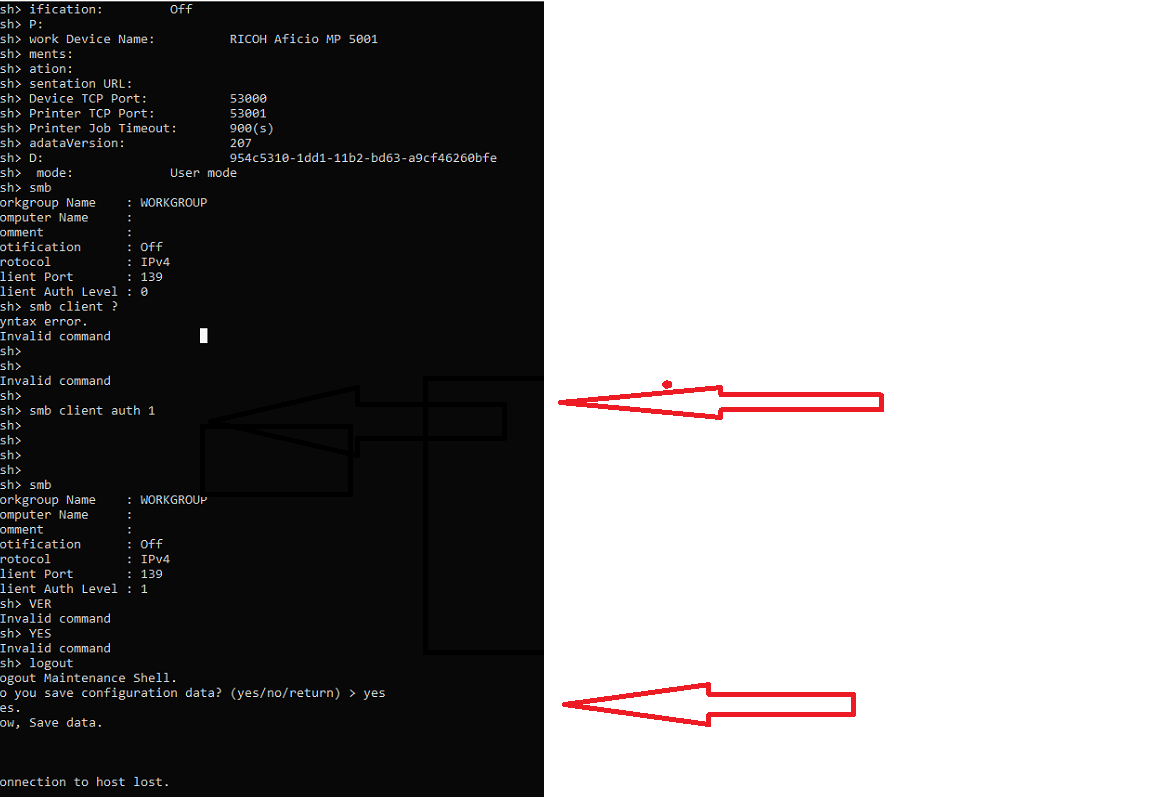
Khởi động lại máy Photocopy
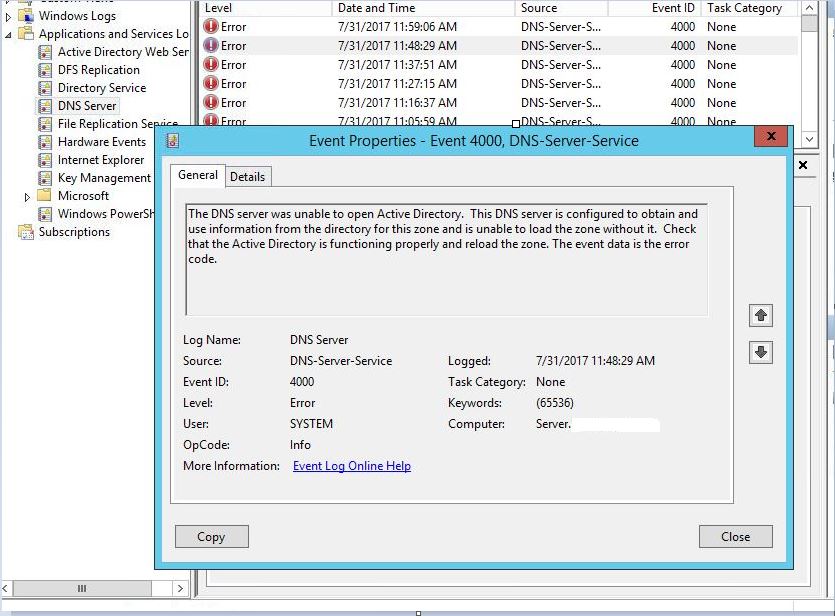
The DNS server was unable to open Active Directory event id 4000
FIX
Run AS administrator to CMD the server Active Directory and change domain.LOCAL and change Domain\domain_admin
netdom resetpwd /server:<PDC.yshvili.local> /userd:<yshvili\administrator> /passwordd:*
-It will prompt for the password of the Domain Admin account that you used, enter that.
-Once the command executes, reboot the server.
-DNS zones should load now.
-Exchange services should be started.
Table 1 summarizes the functionality available in Search-Mailbox and purges executed with compliance search actions. Both have their unique characteristics: compliance searches are faster and can process more mailboxes in a single operation but are limited to what they can remove from a mailbox. Search-Mailbox can focus on Recoverable Items or ignore a mailbox’s archive, while compliance searches can focus on a single target folder. The biggest difference is that Search-Mailbox can copy items to a target mailbox when it removes them from other mailboxes. You can export items with a compliance search, but you must do this separately and before you remove anything.
Get-Mailbox -Database “Source Database Name” -Arbitration
| New-MoveRequest – TargetDatabase “Target Database Name”
Get-Mailbox -Database “Source Database Name” -Archive |
New-MoveRequest -TargetDatabase “Target Database Name”
Get-MoveRequest | where {$_.status -eq “Completed”} | Remove-MoveRequest
![[image%255B3%255D.png]](https://blogger.googleusercontent.com/img/b/R29vZ2xl/AVvXsEhQelZK56gLWBCQubqOONoiwtIVCbTuLOSM3Z9RB-7QgszaLlA_5YE6UVyDUmDbiyTP2kw5v-SSq8foFuw4Xmvv4TwjzCcA72GJRqSerMpUmglzXT8VDyGRO5RaKfvedhIUKl9GC6FSYHfF/w640-h416/image%25255B3%25255D.png)
A special Rpc error occurs on server S-XXXXXX: Could not grant Network Service access to the certificate with
thumbprint xxxxxxxxxxxxxxxxxxxxxxxxxxxxx because a cryptographic exception was thrown.
    + CategoryInfo          : NotSpecified: (:) [Enable-ExchangeCertificate], InvalidOperationException
    + FullyQualifiedErrorId : [Server=S-XXXXXX,RequestId=0ce68699-de3e-4ac4-9c7a-094b538d302d,TimeStamp=01/06/2020 13:
   59:03] [FailureCategory=Cmdlet-InvalidOperationException] D9EA479C,Microsoft.Exchange.Management.SystemConfigurati
  onTasks.EnableExchangeCertificate
    + PSComputerName        : s-XXXXXX.xxxxxxxx.co.uk
